Session recaps for coaches
AI recaps built for coaches, not meeting notes anymore.
Record any session, Zoom, Meet, or in person. A client-ready recap lands in 3 minutes so you never type one at midnight again.
 Download extension
- Full refund within 30 days
Three steps. Zero typing.
Coach like you normally would. We deliver the structured recap before your client walks off the floor.
You record
On your phone in person, or let the Chrome extension capture your Zoom or Meet call locally. No prep, no script.
AI transcribes & structures
We turn the audio into goals, key actions, how it felt, and the next session plan — in real coaching language.
The recap ships to your client
Skim it for 30 seconds, hit send. Under 3 minutes per session, end to end.
Get instant summaries you can trust
myaftercall turns every meeting into a clear summary with decisions, action items, and insights.

See the words, as they're spoken
Live transcription in multiple languages, and speaker recognition.
 Henri0:01
 Sarah0:08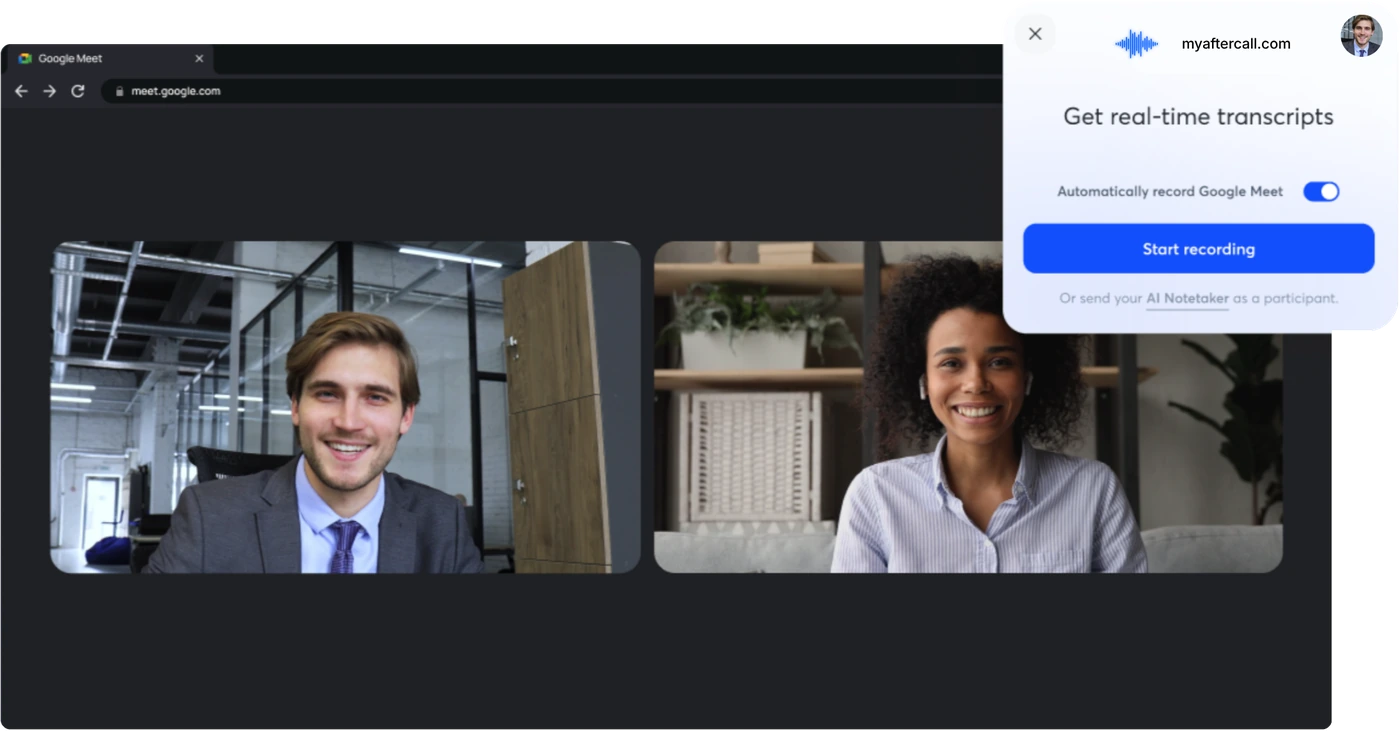
Detects every call. Records in one click.
Open Zoom or Meet, the Chrome extension pops up the moment it sees a meeting.
Coaches are getting their evenings back.
Real words from trainers, studio owners and online coaches who let myaftercall handle the follow up.

My clients get their recap before they even reach the parking lot. It lists every lift, the loads, and the cues I gave them. Honestly it has changed how seriously they take their programming.

Worth every single penny. I got a couple of hours back every week and my clients get a far more professional follow up. It paid for itself in the first month.

Setup took five minutes and it has worked on every single call since. I do not have to think about it anymore, it just runs in the background. That is exactly what I wanted from a tool like this.

We run four trainers out of one small studio. The recaps are consistent across every one of us now, with the same clean format and tone. It makes us look like a far bigger and more organized brand than we are.

This pays for itself the moment it keeps a single client around. The recaps give people a reason to stay engaged between our calls. For me that is the whole game.

Best thing I have added to my business in years, no contest. It disappears into the background and just works on every session. My clients think I suddenly became incredibly detail oriented.

My remote clients finally feel like they are getting real one on one attention. The recaps bridge the gap between our video calls perfectly. It is the closest thing to being in the room with them.

Three minutes from finishing a session to a polished recap sitting in their inbox. It still feels a little like magic to me. My old process took the better part of an hour.
My clients get their recap before they even reach the parking lot. It lists every lift, the loads, and the cues I gave them. Honestly it has changed how seriously they take their programming.
Worth every single penny. I got a couple of hours back every week and my clients get a far more professional follow up. It paid for itself in the first month.
Setup took five minutes and it has worked on every single call since. I do not have to think about it anymore, it just runs in the background. That is exactly what I wanted from a tool like this.
We run four trainers out of one small studio. The recaps are consistent across every one of us now, with the same clean format and tone. It makes us look like a far bigger and more organized brand than we are.
This pays for itself the moment it keeps a single client around. The recaps give people a reason to stay engaged between our calls. For me that is the whole game.
Best thing I have added to my business in years, no contest. It disappears into the background and just works on every session. My clients think I suddenly became incredibly detail oriented.
My remote clients finally feel like they are getting real one on one attention. The recaps bridge the gap between our video calls perfectly. It is the closest thing to being in the room with them.
Three minutes from finishing a session to a polished recap sitting in their inbox. It still feels a little like magic to me. My old process took the better part of an hour.

I used to sit down at ten at night and try to remember what each client did. Now the recap is written and sent by the time I lock up the gym. I got my evenings back and the notes are better than before.

I was completely skeptical when I signed up. Three weeks in and I cannot picture coaching without it anymore. The transcription stays accurate even in a loud weight room.

The transcription is scary accurate, even with loud music and people dropping weights nearby. I expected to spend ages correcting it. Instead I skim it for thirty seconds and hit send.

Clients keep telling me how organized and on top of things I have become. I am definitely not about to correct them. The truth is the tool does the heavy lifting and I just review it.

I was slowly losing people who felt forgotten between sessions. That problem is just gone now. Every fighter walks away with a clear written summary of what we worked on and what comes next.

My retention numbers went up and this is the only thing I changed in my process. The follow up is finally consistent and on brand. People notice when you make them feel remembered.

Clean, fast, and the format is the same every single time. My athletes have come to trust it and they read every line. Consistency turned out to matter more than I expected.

I almost cancelled in the very first week because I had not figured it out yet. Now it is the first thing I open after every class without fail. I would genuinely be lost without it at this point.
I used to sit down at ten at night and try to remember what each client did. Now the recap is written and sent by the time I lock up the gym. I got my evenings back and the notes are better than before.
I was completely skeptical when I signed up. Three weeks in and I cannot picture coaching without it anymore. The transcription stays accurate even in a loud weight room.
The transcription is scary accurate, even with loud music and people dropping weights nearby. I expected to spend ages correcting it. Instead I skim it for thirty seconds and hit send.
Clients keep telling me how organized and on top of things I have become. I am definitely not about to correct them. The truth is the tool does the heavy lifting and I just review it.
I was slowly losing people who felt forgotten between sessions. That problem is just gone now. Every fighter walks away with a clear written summary of what we worked on and what comes next.
My retention numbers went up and this is the only thing I changed in my process. The follow up is finally consistent and on brand. People notice when you make them feel remembered.
Clean, fast, and the format is the same every single time. My athletes have come to trust it and they read every line. Consistency turned out to matter more than I expected.
I almost cancelled in the very first week because I had not figured it out yet. Now it is the first thing I open after every class without fail. I would genuinely be lost without it at this point.

It captures every set, every score, every little cue I throw out mid workout. My athletes feel like I remember everything about their training, and now I genuinely do. The detail is something I could never keep up with by hand.

My clients actually read these recaps now, which never happened with my old emails. They reply asking what to focus on next session. It has turned follow up into a real conversation.

I coach fourteen people a week and the follow up used to completely bury me. Now it quietly handles itself and I barely lift a finger. The recaps look more professional than anything I wrote by hand, and my retention has climbed because of it.

I sent my very first recap and the runner booked three more sessions that same night. The breakdown of pacing and form notes clearly landed. I have never had a follow up convert like that.

The next session plan it drafts is genuinely thoughtful and specific. I usually change one line and send it straight off. It saves me the part of the job I always dreaded.

It catches the small details I would have completely forgotten by the time I sat down to write anything. A grip cue here, a tempo note there. Those little things are what make clients trust you.

I walk into every session already briefed on exactly what we did last time. Clients absolutely notice the difference and mention it often. It makes the whole experience feel premium.

My athletes reply to these recaps more than any email I have ever sent them. The pacing notes and next steps give them something concrete to act on. Engagement between sessions has completely transformed.
It captures every set, every score, every little cue I throw out mid workout. My athletes feel like I remember everything about their training, and now I genuinely do. The detail is something I could never keep up with by hand.
My clients actually read these recaps now, which never happened with my old emails. They reply asking what to focus on next session. It has turned follow up into a real conversation.
I coach fourteen people a week and the follow up used to completely bury me. Now it quietly handles itself and I barely lift a finger. The recaps look more professional than anything I wrote by hand, and my retention has climbed because of it.
I sent my very first recap and the runner booked three more sessions that same night. The breakdown of pacing and form notes clearly landed. I have never had a follow up convert like that.
The next session plan it drafts is genuinely thoughtful and specific. I usually change one line and send it straight off. It saves me the part of the job I always dreaded.
It catches the small details I would have completely forgotten by the time I sat down to write anything. A grip cue here, a tempo note there. Those little things are what make clients trust you.
I walk into every session already briefed on exactly what we did last time. Clients absolutely notice the difference and mention it often. It makes the whole experience feel premium.
My athletes reply to these recaps more than any email I have ever sent them. The pacing notes and next steps give them something concrete to act on. Engagement between sessions has completely transformed.
Your tools, your workflow.
Connect the calls you already run.

Google Meet
The extension captures your Meet session locally and turns it into a clean client recap.

Zoom
Record every Zoom call right from your browser — no bot joins the room. The recap is ready the moment you hang up.
Choose the plan that's right for you
Pro
Most popularFor solo coaches & trainers
Billed monthly. Cancel anytime.
Buy now- Unlimited session recaps
- Zoom & Meet recording + audio upload
- Coach Vocabulary Engine (FR/EN)
- 12 session templates (1-on-1, group, intake…)
- Auto-send to client + section editing
- 30-day money-back guarantee
Lifetime
Best valuePay once. Yours forever.
Billed one time, then free, forever.
Buy lifetime- Never billed again
- All future features included
- Founder onboarding call (1-on-1)
- Priority support
Gyms & Business
For studios, gyms & teams
Volume pricing for your whole team.
Schedule a demo- Multiple coach seats
- Team dashboard & usage analytics
- Centralized billing
- Priority support, replies in < 4h
- Custom onboarding & training
Frequently Asked Questions
How is this different from Otter, Fathom, or general meeting tools?
Is my data and my clients' data protected?
Does it work with my Apple Watch or headset?
How long does a recap take?
Will my client see anything join the call?
Can I export my recaps if I leave?
Coach more. Write less.
Record the session, skim for 30 seconds, hit send. Your client gets a pro recap, exercises, RPE, next-session plan, in under 3 minutes.
- First recap free in 5 min — no card
- Save 2h by recap #3, or full refund
- 30-day money-back guarantee